Showing posts with label Java. Show all posts

Jun 26, 2010

Singleton Design Pattern

The Singleton creation pattern is a common programming idiom.The Singleton is a useful Design Pattern for allowing only one instance of your class to be created, but common mistakes can inadvertently allow more than one instance to be created.

The classic example is:


This is a good solution and design of this class ensures that only one Singleton object is ever created. The constructor is declared private and the getInstance() method creates only one object  In the general case, however, it is not thread-safe. This implementation is fine for single threaded program but when multiple threads are introduced then getInstance() method must be protected.

Consider two threads calling the getInstance() method concurrently and the following sequence of events.
  1. Thread A calls the getInstance() method and determines that instance is null at //1.
  2. Thread A enters the if block at //1, but is preempted by thread B before executing the line at //2.
  3. Thread B calls the getInstance() method and determines that instance is null at //1.
  4. Thread B enters the if block at //1 and creates a new Singleton object and assigns the variable instance to this new object at //2.
  5. Thread B returns the Singleton object reference at //3.
  6. Thread B is preempted by thread A.
  7. Thread A starts where it left off and executes line //2 which results in creation of another Singleton object.
  8. Thread A returns this second object at //3.
The above classic example creates two Singleton objects when it should create one. This problem can be corrected by synchronization of getInstance() method, which would allow only one thread to execute at a time in getInstance() method.


    The synchronized code mentioned above works correctly for a multithreaded access to getInstance() method. But on carefully looking at the code, you can easily make out that instead of synchronizing whole of getInstance() method, synchronization is required only for the first invocation of the method. Subsequent invocations to getInstance() method does not require synchronization because the first invocation is the only invocation that executes the code at line //2. Synchronization has performance cost associated with it, so in order to make above program more efficient we have following third approach.


    SyncSingleton_2 class also exhibits the same problem as was there with the Classic approach.

    Consider two threads calling the getInstance() method concurrently and the following sequence of events.
    1. Thread A calls the getInstance() method and determines that instance is null at //1.
    2. Thread A enters the if block at //1, but is preempted by thread B before entering the Synchronized block..
    3. Thread B calls the getInstance() method and determines that instance is null at //1.
    4. Thread B enters the if block at //1 and creates a new Singleton object and assigns the variable instance to this new object at //2.
    5. Thread B returns the Singleton object reference at //3.
    6. Thread B is preempted by thread A.
    7. Thread A starts where it left off and executes line //2 which results in creation of another Singleton object.
    8. Thread A returns this second object at //3.

    To fix the above problem there is solution which require that a second check should be made before creating the object. This method is called Double Checked locking.
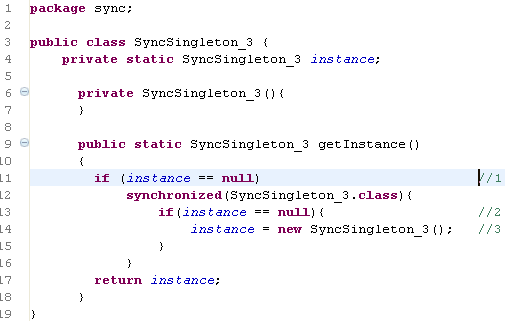


    The concept behind double-checked locking is that the second check at //2 makes it impossible for two different SyncSingleton_3 objects to be created.
    The concept behind Double Check Locking makes it perfect, but this is not the case.The problem with double-checked locking is that there is no guarantee it will work.This is because of Java Platform memory model which allow out-of order writes. We won't be covering that here.

    The bottom line is that double-checked locking, in whatever form, should not be used because you cannot guarantee that it will work. So there are only two options left which are as follows.
    1. First is to synchronize getInstance() method, which we have already covered above.
    2. Second is to let go synchronization and use static instead, which we will cover now.


    In the above scenario StaticSingleton object is not created until call is made to static getInstance() method. This is a good alternative is you donot wish to use synchronisation.The Java specs guarantees that the static initializer will be executed only once, at class load time. There could be an argument that, this would create an object if someone refers to the class or at class loading time even if it is not used and this becomes a valid argument when the object is heavy.

    An embedded static final class can defer this as shown below


    If someone happens to refer to StaticSingleton.class , the singleton object would not be created unless explicit call to getInstance() method is not done.At that time, SingletonHolder is referred to; its class loads; and its static member instance is instantiated.

    There is one thing clear after above discussion on Singleton, that any implementation should be matched carefully to the application at hand.

    Dec 16, 2008

    Identifiers in Java

    Some points about Identifiers
    1. A name in a program is called an identifier.
    2. An identifier is sequence of characters which can be a letter, digit, connecting characters (Underscore _) or a currency symbol ($, ¢, ¥ or £).
    3. Identifier cannot start with a digit, after first character digits are allowed.
    4. Identifiers in java are case sensitive i.e. test and Test are two different Identifiers.
    5. Identifier can be of any length
    6. Keywords cannot be used as an Identifier.

    Illegal Identifier

    1. 45abcd – Starting with a digit
    2. abcd@efgh – @ is not allowed
    3. new – Keyword not allowed

    Legal Identifier

    1. $$ – $ is allowed
    2. Ab88cd – Digits are allowed after first character.
    3. Abc_88 – Underscore is a valid connecting character.

    Important Point about hash code

    Important points about hash code
    1. Hash code is used for increasing the performance of large collection of data.
    2. Hash code is not always unique.
    3. Hash code only tell about the bucket to go into, but not how to locate the name once we are in that bucket.
    4. Collection use the hash code value of the object to decide in which bucket / slot the object should land.
    5. If two objects have same hash code value then it is not necessary that they are equal.
    6. Hashing is a two step process firstly search the right bucket using the hash code value, then search for the element in the bucket using equals()

    equals() and ==

    == operator evaluates to true, only when both references refer to the same object
    e.g reference a------------> Object1
    reference b------------> Object1
    then a == b returns true.

    1. String class and Wrapper classes has override equals() method , so that two different objects could be compared to see if their contents are meaningfully equal.
    2. If classes equals() method is not overridden then it cannot be used as key in a Hashtable.
    3. equals() method in Object Class use only the == operator for comparison.
    4. If two objects are considered equal by using the equals() method then they should have identical hashcode values. So it is advisable to override hashCode() when equals() is overridden.

    Dec 15, 2008

    Basics of Java

    Complexity can be handled by abstraction. In OOPS abstraction is modeled using Classes and objects.
    A Class models abstraction by defining properties and behavior of an object.
    Properties of an object are defined by the attributes, which are fields in java. A field in java is a variable that can hold value.
    Behavior of an object is defined by the methods in java.

    Object is an instance of the class. In java objects can only be manipulated using references.
    Each Object created maintains its own copy of instance variables. Two objects can have same state if the values of their instance variable are same.
    Object communicates with each other using message passing.

    Static members/methods
    1. Certain members belong to Class only not to object these are called static members.
    2. A static member is initialized when the class is loaded at runtime.
    3. Certain methods that belong to the Class only and not to an object are called static methods.
    4. Client can access static methods using the class name.
    5. Static members of the Class can be accessed either using Object reference or using Class name.
    Example of Class & Object
    package Test;
    //Class declaration
    public class Example_Class {
    //Attribute declaration - These variables defines the state of the object
    private int first_attribute;
    private int second_attribute;
    //constructor
    public Example_Class(int x, int y) {
    //Initializing attributes of newly created object.
    this.first_attribute = x;
    this.second_attribute =y;
    }
    //Method - These methods define the behavior of the object
    public int addResult() {
    return first_attribute + second_attribute;
    }
    //Main method of Class
    public static void main(String[] args) {
    /* Object instantiation - Object is created using "new" keyword With new keyword Constructor of the class is called which returns the reference of the newly created object, which is assigned to
    reference variable of appropriate Class.
    */
    // objFirst ---------> Object1(1,2)
    Example_Class objFirst = new Example_Class(1, 2);
    //Both objFirst and objSecond object refernces will point to two different objects in heap
    // objSecond ---------> Object2(1,2)

    Example_Class objSecond = new Example_Class(1, 2);
    int addResultFirst = objFirst.addResult();
    System.out.println("Add Result First:" + addResultFirst);
    //Calling method on second created Object
    int addResultSecond = objSecond.addResult();
    System.out.println("Add Result Second:" + addResultSecond);
    }
    }

    Nov 29, 2008

    Important Points about Threads in Java


    1. To synchronize threads, the Java programming language uses monitors, which are a high-level mechanism for allowing only one thread at a time to execute a region of code protected by the monitor.
    2. The behavior of monitors is explained in terms of locks; there is a lock associated with each object.
    3. The methods wait, notify, and notifyAll of class Object support an efficient transfer of control from one thread to another.
    4. A thread can suspend itself using wait until such time as another thread awakens it using notify.
    5. Each thread has a working memory, in which it may keep copies of the values of variables from the main memory that is shared between all threads.
    6. To access a shared variable, a thread usually first obtains a lock and flushes its working memory. This guarantees that shared values will thereafter be loaded from the shared main memory to the threads working memory.
    7. When a thread unlocks a lock it guarantees the values it holds in its working memory will be written back to the main memory.
    8. Every thread has a working memory in which it keeps its own working copy of variables that it must use or assign. As the thread executes a program, it operates on these working copies. The main memory contains the master copy of every variable.
    9. The main memory also contains locks; there is one lock associated with each object. Threads may compete to acquire a lock.

    Jul 25, 2008

    Finalization in Java

    protected void finalize() throws Throwable
    
    
    1. It is declared in Object class.
    2. Is invoked by the garbage collector after it determines that this object is no longer reachable and its space is to be reclaimed.
    3. finalize is that it is invoked if and when the JavaTM virtual machine has determined that there is no longer any means by which this object can be accessed by any thread that has not yet died, except as a result of an action taken by the finalization of some other object or class which is ready to be finalized.
    4. Subclasses of Object may override this definition.
    5. It is guaranteed that the thread that invokes finalize() will not be holding any user-visible synchronization locks when finalize() is invoked.
    6. Any exception thrown by the finalize() causes the finalization of this object to be halted, but is otherwise ignored.
    7. finalize() is invoked at most once per object, even if execution of this method causes the object to become reachable again and later it becomes unreachable again.

    Feb 16, 2008

    ENUMS in Java

    Some Important points about Java Enums.
    1. Enums can be declared as their own separate class, or as a class member, however they must not be declared within a method.
    2. Enums can be declared outside the class.
    3. Enums cannot be private or protected.
    4. Enums can have only default or public modifier.
    5. Semicolon at the end of Enums declaration is optional.
    6. Enum is a special type of Class.
    7. Enum constructor are never invoked directly
    8. Enum constructor can be overloaded just like any other constructor in class.
    9. If an enum is declared as public then it should be declared in its own file.
    10. Enums declared within a class can have public, private, protected, default, static and abstract modifiers

    package TechnicalTutorial;

    /* Enum declared outside the class can have default access only */

    enum TechEnum{
    FIRST, SECOND, THIRD
    }

    public class Example_1 {

    public enum TechEnum_2{
    HUNDRED, THOUSAND
    }

    public static void main(String[] args) {
    TechEnum num = TechEnum.FIRST;
    System.out.println(num);

    }
    }

    In above example enum can be declared as public only within a Class i.e. TechEnum_2 . If an enum need to be declared as public outside the class then it should be created in separate file.